What is BookFusion?
BookFusion is a cloud ebook library and reader. You upload your books to BookFusion’s cloud and read them in its apps for iPhone, iPad and Android, in a web app, or in its Windows app. A Calibre plugin syncs your Calibre library, and a KOReader plugin syncs reading progress and highlights with Kobo, PocketBook and reMarkable devices running KOReader.
The apps read EPUB, PDF, MOBI, CBZ and CBR. Other formats such as AZW3, DOCX, FB2 and TXT go through the web app first. Reading position, highlights, bookmarks and settings sync across devices, and highlights export as Markdown, CSV, HTML or PDF, or go to Notion and Obsidian.
BookFusion is free for up to 10 books on 3 devices. Paid plans are subscriptions: Casual ($1.99/month, 5 GB), Advanced ($4.99/month, 20 GB) and Power ($9.99/month, 100 GB), with yearly billing at $18.99, $47.99 and $95.99. BookFusion lists these as early-adopter prices, below its regular $2.99, $7.99 and $14.99.
Try BookShelves free
EPUB, PDF and comics on Mac, iPhone and iPad. No account, no ads.


The trade-off: cloud service vs. native app
BookFusion is built around its cloud: your library lives on its servers and every platform reads from there. BookShelves is built around your devices: books stay on your Mac, iPhone and iPad, and Pro syncs them through your own iCloud account.
- No native Mac app. On a Mac, BookFusion runs its iPad app, which the App Store lists as designed for iPad and not verified for macOS.
- A subscription for more than 10 books. The free plan holds 10 books, with 2 more uploads a month after that. Beyond that, you pay every month or year.
- Your library lives in BookFusion’s cloud. Sync, sharing and storage limits all depend on the BookFusion service and your plan.
- Some formats need the web app. AZW3, DOCX, FB2 and TXT books have to be uploaded through the web app before the mobile apps can open them.
Feature comparison
| Feature | BookShelves | BookFusion |
|---|---|---|
| Platforms | macOS, iOS, iPadOS | iOS, iPadOS, Android, Windows, web (iPad app on Apple silicon Macs) |
| Native Mac app | Yes | No |
| Formats | EPUB, KEPUB, PDF, MOBI, AZW, AZW3, FB2, TXT, Markdown, HTML, CBZ, CBR, CB7 | EPUB, PDF, MOBI, CBZ, CBR; AZW3, DOCX, FB2, TXT through the web app |
| Where books are stored | On your devices; iCloud sync with Pro | BookFusion's cloud, with offline downloads |
| Account required | No | BookFusion account |
| Library organization | Shelves, tags, series, grid/list views, sort by multiple fields | Shelves, series, tags, author filters |
| Metadata lookup | Automatic on import (title, author, cover) | — |
| Export highlights | Markdown, JSON, CSV (Pro) | Markdown, CSV, HTML, PDF; Notion, Obsidian |
| Free book catalog | Built-in (Standard Ebooks, Internet Archive, and more — 1.5 million+) | Catalog of 70,000+ ebooks |
| OPDS | Client (free) + server to share your library (Pro) | — |
| Calibre | Calibre wireless server on Mac (Pro), OPDS, folder import | Calibre plugin |
| Send to e-reader | Kindle, PocketBook (Pro) | Send to Kindle (5 a month free) |
| Text-to-speech | No | Yes |
| Price | Free up to 10 books; one-time Pro upgrade in most countries | Free up to 10 books; $1.99–$9.99/month |
What BookShelves does differently
A native Mac app
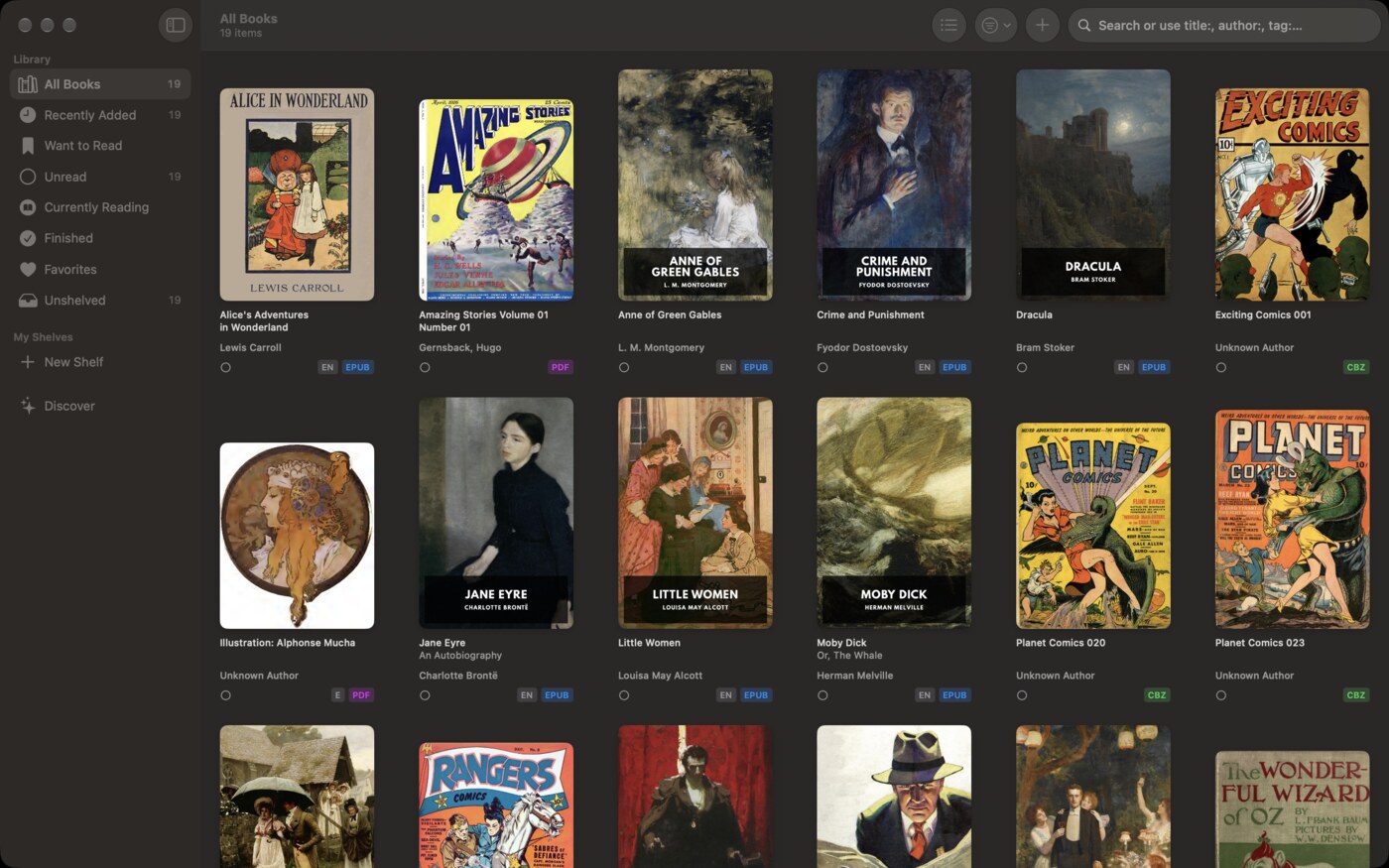
BookShelves is built for macOS as well as iPhone and iPad: multiple windows, menus, keyboard shortcuts and drag-and-drop import. BookFusion’s Mac experience is its iPad app.
Your books stay on your devices
BookShelves needs no account. Books live on your devices, and with Pro they sync through your personal iCloud account, using your own iCloud storage instead of a separate storage plan.
Pay once
BookShelves is free for up to 10 books. Pro removes the limit and adds iCloud sync, highlight export and Send to E-Reader, as a one-time purchase in most countries.
More formats on import
BookShelves opens EPUB, KEPUB, PDF, MOBI, AZW, AZW3, FB2, TXT, Markdown, HTML and CBZ/CBR/CB7 comics directly, converting non-EPUB books on import. No web upload step.
1.5 million+ free books
BookShelves has a built-in catalog of public domain books from Standard Ebooks, Internet Archive and more, ready to download.
Where BookFusion is the better choice
You read on Android, Windows or the web
BookFusion runs on iOS, Android, Windows and in a browser. BookShelves runs on Apple devices only.
You want text-to-speech
BookFusion reads books aloud with Apple’s voices, and its Advanced and Power plans add streaming realistic voices. BookShelves doesn’t have text-to-speech.
You want highlights in Notion or Obsidian
BookFusion sends highlights to Notion and Obsidian. BookShelves exports Markdown, JSON or CSV that you can import yourself.
You read on a KOReader device
BookFusion’s KOReader plugin syncs reading progress and highlights between its apps and Kobo, PocketBook and reMarkable devices running KOReader. BookShelves serves your library to KOReader through its OPDS server (Pro).
Switching to BookShelves
- Gather your book files — the original files you uploaded to BookFusion.
- Drag them into BookShelves — drop them onto the BookShelves window or use the import dialog. Metadata and covers are looked up automatically.
- Turn on iCloud sync (Pro) — your books, reading positions and highlights then follow you across your Apple devices.
Highlights don’t transfer between apps. Export them from BookFusion as Markdown or CSV first if you want to keep them.
See the full feature list for everything BookShelves offers.
Sources: BookFusion website, App Store listing.