What is the Kindle app?
The Kindle app lets you read ebooks purchased from Amazon on your Mac, iPhone, or iPad. It syncs your library, reading progress, bookmarks, and highlights across devices through Amazon’s Whispersync. If you buy books from Amazon, it’s the default way to read them on Apple devices.
The app also includes features like X-Ray (character and term lookups), Word Wise (inline definitions for difficult words), and dictionary integration. For books bought from Amazon, the reading experience is solid.
The problems start when you try to read anything that doesn’t come from Amazon.
The problem: Kindle is Amazon’s ecosystem
Kindle isn’t just a reader — it’s the front end for Amazon’s ebook store. Every design decision serves that relationship. If your reading life extends beyond Amazon, you’ll hit walls quickly.
- No native EPUB support. EPUB is the universal ebook standard, used by libraries, independent bookstores, Project Gutenberg, Standard Ebooks, and most of the non-Amazon ebook world. The Kindle app cannot open EPUB files. You have to email them to Amazon via “Send to Kindle,” where they’re converted server-side into Amazon’s proprietary format. Formatting may not survive the conversion intact.
- Proprietary formats lock you in. Books you buy from Amazon use KFX or AZW3 with Amazon’s proprietary DRM. You can only read them in Kindle apps or on Kindle devices. If you ever want to leave the Amazon ecosystem, your purchased library stays behind.
- You don’t own your books. Amazon licenses ebooks to you — they don’t sell them. Amazon can revoke access to books you’ve paid for, and has done so in the past. In February 2025, Amazon removed the ability to download purchased books via USB, eliminating the last easy way to back up your library.
- Reading is tracked. Amazon collects detailed data about your reading habits: which pages you read, when, how long you spend on each page, what you highlight, and what you search for. This data is used for recommendations and advertising. Disabling “Reading Insights” in the app doesn’t stop the underlying data collection.
- macOS app has a troubled history. The Kindle for Mac app was slow to support Apple Silicon and has gone through multiple rewrites that removed features. The current version is an iOS port that lost capabilities like proper keyboard navigation. Users report books becoming unreadable after macOS upgrades.
- No library ebook support. Kindle has no integration with public libraries. If you borrow ebooks through Libby or OverDrive, you can’t read them in the Kindle app — those books use EPUB with standard DRM that Kindle doesn’t support.
Feature comparison
| Feature | BookShelves | Kindle |
|---|---|---|
| Platforms | macOS, iOS, iPadOS | macOS, iOS, iPadOS, Windows, Android, Web |
| EPUB | Yes — native rendering | No — must convert via Send to Kindle |
| Yes | Yes (via Send to Kindle) | |
| MOBI / AZW / AZW3 | Yes — auto-converted on import | Yes (Amazon's native formats) |
| KEPUB | Yes — auto-converted on import | No |
| Open EPUB files directly | Yes — drag and drop, file picker | No — requires Send to Kindle intermediary |
| Metadata lookup | Automatic on import (title, author, cover) | Only for Amazon purchases |
| Library organization | Shelves, grid/list views, sort by multiple fields | Collections |
| iCloud sync | Yes — books, position, bookmarks, highlights (Pro) | No — uses Amazon's Whispersync |
| Reading customization | Themes, fonts, line spacing, margins | Themes, fonts, spacing options |
| Highlights & notes | Yes — multi-color, synced | Yes — synced via Amazon |
| Export highlights | Yes — Markdown, JSON, CSV (Pro) | Limited — via Amazon's notebook page |
| Free book catalogs | Built-in (Standard Ebooks, Internet Archive) | No — Amazon store only |
| Reading privacy | No tracking, no telemetry | Detailed reading behavior tracked by Amazon |
| Book ownership | Your files, stored locally | Licensed from Amazon, can be revoked |
| Multi-window (macOS) | Yes — open multiple books side-by-side | No |
| Email to device | Kindle, Kobo, reMarkable (Pro) | Send to Kindle (Amazon devices only) |
| OPDS server | Yes — share library on local network (Pro) | No |
| Vendor lock-in | None — your books are files you control | Yes — DRM-protected books tied to Amazon account |
| Library lending | Read EPUB from any source including libraries | No library integration |
| Book Store | No | Yes — Amazon's Kindle Store |
| X-Ray / Word Wise | No | Yes (for supported titles) |
| Audiobooks | No | Audible integration |
| Price | Free (optional $2.99 one-time Pro upgrade) | Free (books sold separately) |
What BookShelves does differently
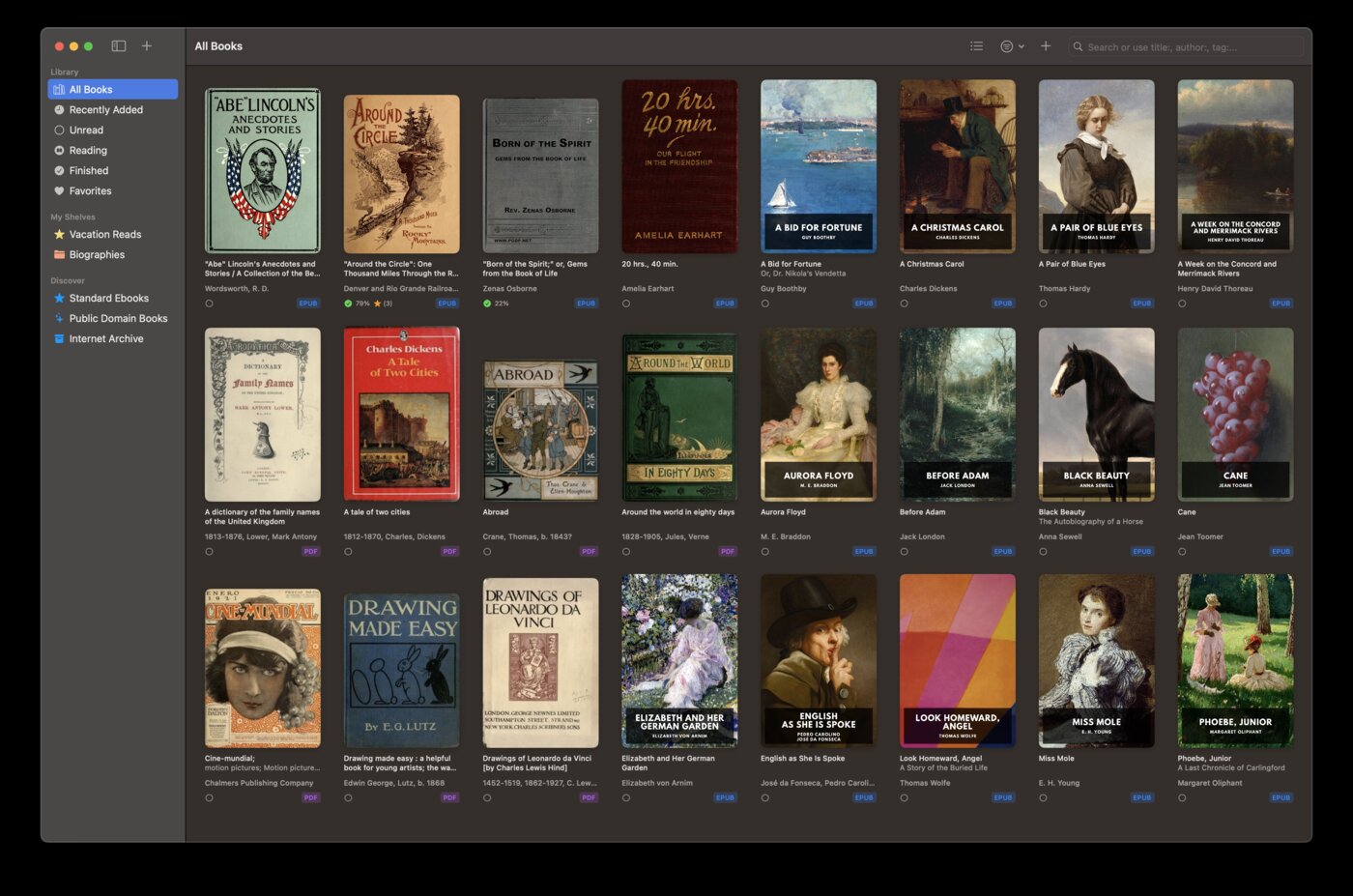
Reads EPUB natively
BookShelves opens EPUB files the way they were designed to be read. Drag an EPUB onto the window and start reading — no conversion, no intermediary service, no server-side processing. The book renders directly from the file on your device, exactly as the publisher intended.
With Kindle, you can’t open an EPUB at all. You have to send it to Amazon through the Send to Kindle service, wait for it to be converted into Amazon’s format, then download the converted version. Formatting, fonts, and layout may change in the process.
Your books, your files
When you import a book into BookShelves, the file lives on your device. You can back it up, move it, or open it in another app. There’s no license agreement governing your access to your own files.
Kindle books are licensed, not owned. Amazon controls access and can revoke it. When Amazon removed USB downloads in February 2025, users lost the ability to back up books they’d paid for. Your Kindle library exists at Amazon’s discretion.
Private reading
BookShelves doesn’t track what you read, when you read, how long you spend on each page, or what you highlight. Your reading habits stay on your device.
Amazon collects detailed reading telemetry through the Kindle app — page turns, session duration, highlights, searches, and more. This data feeds into Amazon’s recommendation and advertising systems. Privacy organizations including Mozilla and Common Sense have flagged Kindle’s data collection practices.
Works with books from anywhere
BookShelves accepts EPUB, PDF, MOBI, AZW, AZW3, and KEPUB files from any source: public libraries (via Libby or OverDrive), Standard Ebooks, Internet Archive, independent bookstores, humble bundles, or your own collection. Non-EPUB formats are automatically converted on import.
Kindle is designed for Amazon’s store. Non-Amazon books require the Send to Kindle workaround, and library ebooks using standard EPUB DRM aren’t supported at all.
Discover free classics
BookShelves has a built-in catalog with thousands of free, public domain books from Standard Ebooks (professionally typeset editions) and Internet Archive. Browse by subject, search by author, and download directly into your library.
Kindle directs you to the Amazon store, where free public domain editions are mixed in with paid content and promotional titles of varying quality.
Export your highlights
Export all your highlights and annotations to Markdown, JSON, or CSV. Use them in your note-taking app, research papers, or blog posts.
Kindle highlights are accessible through Amazon’s notebook page on the web, but there’s no structured export. Third-party tools exist to extract them, but they rely on scraping Amazon’s website and can break when Amazon changes the interface.
Where Kindle is the better choice
You buy most of your books from Amazon
If Amazon is your primary bookstore, Kindle is the natural reader. Your purchases sync automatically, recommendations are tailored to your history, and features like X-Ray and Word Wise only work with Amazon titles. BookShelves doesn’t connect to any bookstore.
You read across Amazon devices
If you switch between a Kindle e-reader, Fire tablet, and iOS device, Kindle’s Whispersync keeps everything in sync across all of them. BookShelves syncs through iCloud, which means Apple devices only.
You want X-Ray and Word Wise
X-Ray shows character profiles, setting descriptions, and term definitions inline while you read. Word Wise displays definitions above difficult words automatically. These are genuinely useful reading aids that BookShelves doesn’t offer.
You listen to Audible audiobooks
Kindle integrates with Audible, letting you switch between reading and listening to the same book. BookShelves is an ebook reader only — it doesn’t handle audio content.
Moving away from Kindle
If you’ve been building a library outside of Amazon — EPUBs from libraries, Standard Ebooks, Internet Archive, or other sources — those books can move directly into BookShelves:
- Gather your EPUB files — collect the ebooks you’ve downloaded from non-Amazon sources. If they’re in MOBI or AZW format (older Kindle sideloads), BookShelves can import those too.
- Drag them into BookShelves — drop the files onto the BookShelves window. They’ll be imported and organized automatically.
- Metadata fills in on its own — BookShelves looks up titles, authors, and covers after import. No manual data entry needed for most books.
For books purchased from Amazon with DRM, those remain tied to the Kindle app. There’s no legal way to move DRM-protected Kindle books to another reader. This is the core problem with ecosystem lock-in — and a reason to consider where you buy your next book.

